What is a card-reader and how do I use one?
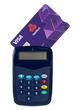
What is a card reader?
A card reader is a device that adds an extra layer of security when you use Online Banking. You may be asked to use it to confirm your identity, especially if:
- You don’t have a mobile number registered with us
- You’ve recently updated your mobile number
When is a card reader required?
You’ll need a card reader to complete certain actions in Online Banking, such as:
- Setting up a new payee
- Making a payment for the first time online
- Updating regular payments (e.g. standing orders)
- Changing the payment reference for saved billers or companies
- Updating personal details (e.g. mobile number, PIN, email address, or password)
- Managing your activity alerts
Don’t have a card reader?
You can order one easily by following these steps:
- Log in to Online Banking at onlinebanking.natwest.com (opens in a new window)
- Select 'Security' from the main menu
- In the 'Using a card reader' section, choose 'Order a card reader'
- Follow the on-screen instructions
How to use a card reader
To use your card reader:
- Insert your card into the reader. Make sure the card number matches the one shown in Online Banking.
- When prompted to 'Select Function', press the button with the up and down arrows.
- Enter your card’s PIN and press 'OK'.
- Enter the number displayed by Online Banking into the card reader and press 'OK'.
- Enter the passcode shown by the card reader into Online Banking.